H3
H3's addition and installation deployment.
- Here, you can find guidance on the addition and installation deployment of H3.
What Should I Prepare?
You need to prepare the items shown in the image below to ensure that the H3 can successfully complete the setup process.
H3 Main Unit and Accessories

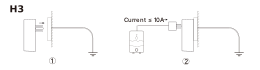
How to Mount It?
How to Set It Up?
Download MOCREO Smart App
You may visit the App Store or Google Play to search for MOCREO Smart or scan the QR code below to download the app.

Authorization
You need to go to the system settings page to grant the following permissions to the MOCREO Smart App to ensure that the device can be added properly and the related functions can be used normally.
Add H3
Follow the steps prompted by the app to complete the H3 addition process.
Note: If you encounter any issues during the Hub setup process, please provide the error messages you see on the H3 and the app, and visit https://mocreo.com/service for further support and help.