LB1
LB1 Siren Setup and Installation
- Guidance on the addition and installation deployment of the LB1 LoRa Strobe Siren.
What should I prepare?
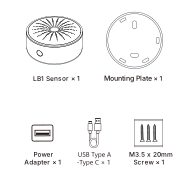
How to set it up?
The LB1 Siren is designed to work within the MOCREO ecosystem and must be paired with a MOCREO Hub (H5Pro, H6Pro, or other LoRa Hubs).
Add LB1 LoRa Strobe Siren
- Download MOCREO Smart App: Search for "MOCREO Smart" in the App Store or Google Play.
- Open the App: Ensure you have already added a compatible LoRa Hub.
- Add Device: Tap the "+" button, select "LB1 Siren", and follow the on-screen instructions.
- Configure Alerts: Go to Sensor Alert Settings in the app and select "LB1 Siren" as the alert device for your sensors.
Mounting Instructions
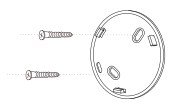
- Fix the Mounting Plate: Secure the mounting plate to the desired surface using the provided screws.
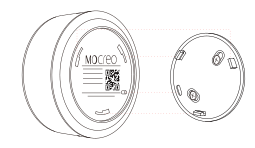
- Install the LB1 Siren: Align the positioning slots on the mounting plate with the pillars on the bottom of the LB1 Siren.
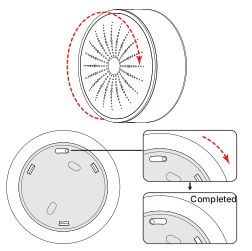
- Lock in Place: Rotate the LB1 Siren unit slightly clockwise to lock it securely.
Tip: Use the physical button on the LB1 to test the connection or silence an active alarm locally.