NS2
NS2 Wi-Fi Thermo-Hygrometer
System: MOCREO Smart System
The NS2 Wi-Fi Thermo-Hygrometer is equipped with a color IPS LCD display that easily shows the current temperature and humidity at a glance. The only difference between NS2 and NS1 is that NS2 supports humidity monitoring in addition to temperature monitoring.
Press the button of the Thermo-Hygrometer to view historical data and device information, easy to read and setup.
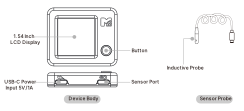
Appearance and Function Description
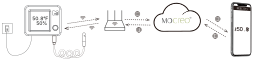
System Operation Diagram
Specifications
| Specification | Details |
|---|---|
| Model | NS2 |
| Physical Buttons | 1 |
| Display | 1.54-inch, 240 x 240 IPS LCD, non-touch |
| Wireless Protocols | Wi-Fi 2.4 GHz (802.11 b/g/n; 5 GHz not supported), BLE 5.0 |
| Probe Measuring Range | -40°F to 221°F (-40°C to 105°C) |
| Temperature Accuracy | ±0.9°F (14°F to 185°F) |
| Operating Humidity | 0% to 80% RH, non-condensing |
| Humidity Accuracy | ±3% RH (typical @ 25°C) |
| Built-in Buzzer | Supported on new-version hardware |
| Power Input | DC 5 V / 1 A USB adapter (not included in the box) |
Note: New-version NS2 Sensors include a built-in buzzer. Previously produced NS2 hardware does not support a built-in buzzer.
NS2 Button Instructions
Supported from Firmware Version: v1.0.1
| Action | Duration | Function |
|---|---|---|
| Short Press | < 2s | Wake screen when off; Switch page when screen on; Mute alarm when alarm is active. |
| Long Press | 2s - 5s | Turn screen on/off. |
| Long Press | 5s - 10s | Enter/Exit Setup Mode (for Wi-Fi configuration). |
| Long Press | 10s - 15s | Switch display theme (light mode / dark mode). |
| Long Press | > 15s | Factory Reset (restore device to default settings). |
Other
- Setup Guide: Device Setup Center
Troubleshooting & FAQs:
-
Setup & Connectivity (Critical)
-
Data Accuracy & Probes
-
Alerts & General