LD1
LD1 Sensor Setup and Installation
- Guidance on the addition and installation deployment of the LD1 Door and Window Sensor.
What should I prepare?
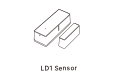
How to set it up?
The LD1 Sensor requires a compatible MOCREO LoRa Hub (H5Pro, H6Pro, etc.) to connect to the cloud.
Add LD1 Door and Window Sensor
- Download MOCREO Smart App: Search for "MOCREO Smart" in the App Store or Google Play.
- Open the App: Ensure your LoRa Hub is online.
- Add Device: Tap the "+" button and follow the prompts to add the LD1 Sensor.
Mounting Instructions
- Peel and Stick: Remove the protective film from the back of both the sensor (Main Unit) and the magnet.
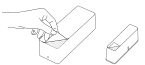
- Align the Marks: Ensure the vertical grooves on both units are aligned.
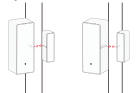
- Mind the Gap: Keep the distance between the Main Unit and the Magnet within 1.18 in (30mm) when the door/window is closed.
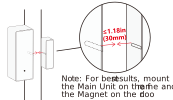
- Placement Tip: For best results, mount the Main Unit on the frame and the Magnet on the door or window.
Note: The LD1 is for indoor use only and is not waterproof.