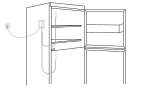
NS3
NS3 Sensor Setup and Installation
- Guidance on the addition and installation deployment of the NS3 Wi-Fi Dual-Probe Sensor.
What should I prepare?
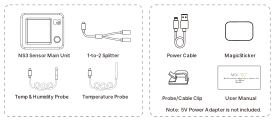
How to set it up?
The NS3 is a standalone Wi-Fi device and does not require a MOCREO Hub.
Add NS3 Wi-Fi Dual-Probe Sensor
- Download MOCREO Smart App: Search for "MOCREO Smart" in the App Store or Google Play.
- Power on the Sensor: Connect the NS3 Sensor to a power source using the provided Type-C Cable. The screen will turn on.
- Add the Sensor: Enable Bluetooth on your smartphone. Open the MOCREO Smart App, tap the "+" button, and follow the prompts.
Mounting Instructions
- Stable Connection: Ensure the NS3 Sensor is placed within range of your Wi-Fi router. Try to install it high up in an open space.
- Avoid Obstacles: Avoid placing the main unit behind large metal objects that might block the signal.
- Probes Installation: Place the probes in the environments you wish to monitor (e.g., Fridge and Freezer). Use the provided clips or tape to secure the cables.
Tip: Use the physical button on the NS3 to toggle through data views or silence the buzzer locally.