MS1 App Addition Guide
Contact SupportKeep the MS1, Hub, and phone close together during setup.
Before You Start
- MS1 sensor
- A compatible Smart System Hub already online in the App
- A phone with the MOCREO Smart App installed and Bluetooth enabled
Keep the MS1, Hub, and phone close together during setup.
Add MS1 in the MOCREO Smart App
- Press and hold the MS1 Setup button for 3 seconds.
- Open the MOCREO Smart App and confirm the Hub is online. A MOCREO account is not required for this addition.
- Tap +, select MS1, and follow the legacy Bluetooth scan page. MS1 does not use automatic Bluetooth discovery.
- Keep the App open until the addition finishes.
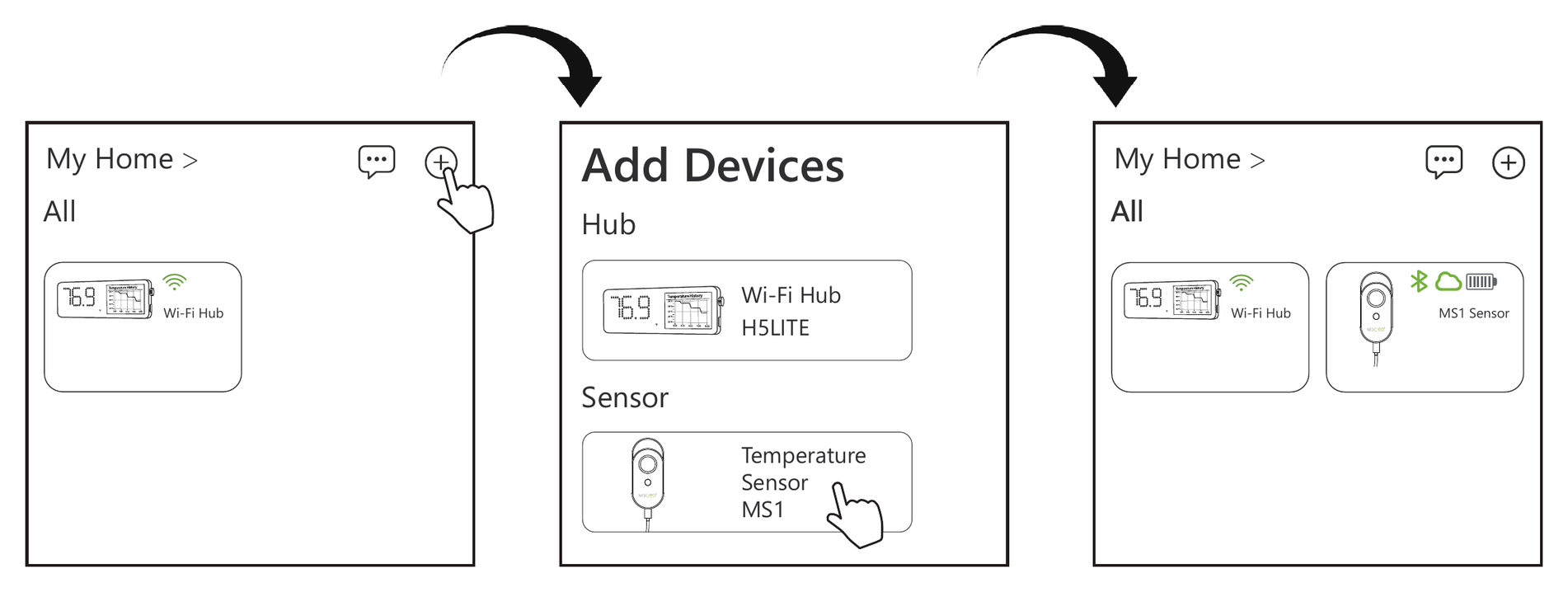
Confirm the Device Was Added
Confirm that the MS1 appears in the App and reports a current temperature reading.
For body and probe placement, see the MS1 Deployment Guide.