MS3
MS3's addition and installation deployment.
- Here, you can find guidance on the addition and installation deployment of MS3. Before reading the following article, please ensure that you have completed the Hub setup process.
What should I prepare?
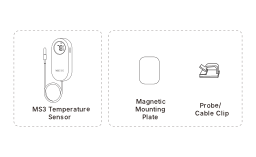
How to set it up?
Before actual deployment, we recommend prioritizing the MS3 Sensor Setup process, which involves adding the sensor via the MOCREO Smart App.
Before adding the MS3 Sensor, please ensure that you have completed the setup process for the Hub deployed at the same location as the sensor.
Add MS3 Sensor
Please place your MS3 Sensor near the Hub and your smartphone to ensure that during the sensor setup process, the sensor can be successfully scanned by both the Hub and your smartphone's Bluetooth.
Pull out the battery tab on the MS3 Sensor, open the MOCREO Smart App, tap "+", select MS3 Sensor, and scan the setup QR code on the product label to add the sensor.
You just need to follow the prompts in the app to complete the MS3 Sensor setup process smoothly.
How to mount it?
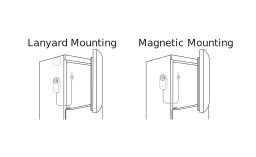
MS3 wireless temperature sensor is widely applicable in low-temperature environments (such as refrigerators and freezers).
The MS3 supports magnetic mounting and lanyard mounting. A lanyard is not included in the box and should be purchased separately if needed.
The following are some considerations for deploying the MS3 Sensor in different environments:
-
In low-temperature environments: Keep the MS3 Sensor body outside the refrigerator or freezer when possible, and place only the external temperature probe inside. The flat probe cable can pass through the door seal with minimal impact on the seal.
-
Probe placement: Before placing the Sensor's external temperature probe, ensure there is sufficient space between the probe and the items in the low-temperature environment to allow for proper air circulation and even temperature distribution. Avoid direct contact between the probe and the items to prevent measurement interference. The probe should be kept away from fans and freezer walls to minimize measurement errors.
-
Special environments: External sensors with stainless steel probes and PVC cable are corrosion-resistant materials. However, there is still a risk of corrosion and aging when exposed for long periods to harmful chemicals, saltwater, grease, humidity, or high temperatures.
Test the Effective Distance
Place the paired MS3 Sensor in the location you want to monitor. The communication range is up to 230 ft/70 m line-of-sight, but walls, metal refrigerator bodies, and other obstacles may reduce the actual range.
Press the MS3 Sensor setup/test button once. Observe whether the time displayed after "Last updated" on the Sensor card in the MOCREO Smart App has been updated to the current time.
If it has been updated to the current time, you may proceed to the Sensor configuration page to check the current real signal level of the Sensor.
Note: If the current signal level of the sensor is weak, we recommend that you readjust the deployment position of the Hub or Sensor.